
Are you trying to understand SCORM vs xAPI? When people ask for a SCORM-compliant online course, they usually want one simple thing: an eLearning package they can upload to a Learning Management System that reports learner progress.
That is a fair request, but it is not the whole picture.
SCORM comes in several versions, while xAPI offers a more modern alternative for tracking learning activity. Each option has its place. The right choice depends on what you need the learning package to do, what your LMS supports, and how much tracking detail you actually need.
When comparing SCORM vs xAPI, it can be difficult to know which eLearning format is right for your course. SCORM 1.2, SCORM 2004 and xAPI all support online learning delivery and tracking, but each format serves a different purpose. Your best choice depends on your authoring tool, your LMS, the learner data you need to capture, and the way learners will access the course.
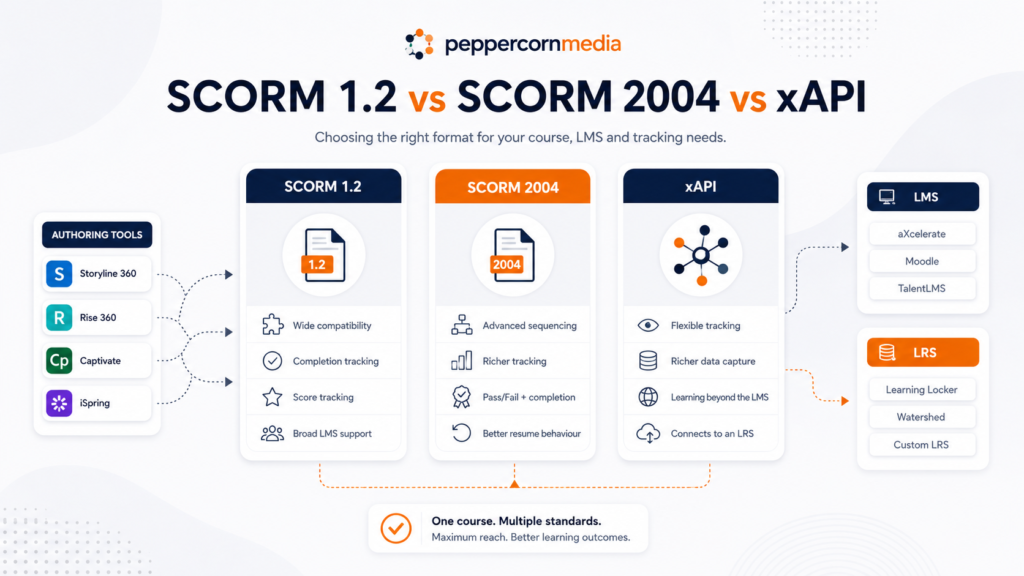
Your authoring tool also matters. Tools such as Articulate Storyline 360, Rise 360, Adobe Captivate, iSpring Suite and Elucidat can usually publish courses in several formats. However, your LMS must also support the selected standard properly.
With thanks to Julian Davis for his helpful input on xAPI, LRS architecture and learning activity beyond the LMS.
The simple version
For most standard eLearning modules, SCORM 1.2 is still the safest and most widely compatible option.
For more complex modules that need stronger progress tracking, better resume behaviour or separate completion and pass/fail reporting, SCORM 2004 may be better, provided your LMS supports it properly.
Organisations that want to track learning beyond a traditional LMS would do well to consider that xAPI is usually the better long-term option. This could include simulations, mobile learning, offline activities, workplace evidence, coaching sessions, equipment use or learning activity across multiple systems.
The key difference is not just that xAPI can capture richer data. Its bigger advantage is that xAPI does not require the learning activity to be launched by an LMS.
Instead, any suitable system can send learning statements directly to a Learning Record Store, or LRS. That changes the role of the LMS. Rather than being the only system that launches, tracks and stores learning activity, the LMS can become one part of a broader learning ecosystem.
Here, we take a closer look at SCORM vs xAPI and how to choose the right format for your course, LMS and tracking needs.
What SCORM does
SCORM stands for Sharable Content Object Reference Model. In practical terms, it lets an eLearning module and an LMS talk to each other.
A SCORM package can usually report things lik
| What the LMS may receive | Example |
|---|---|
| Completion status | Complete / incomplete |
| Success status | Passed / failed |
| Score | 85% |
| Time spent | 42 minutes |
| Bookmarking or resume data | Learner returns to the last visited slide |
| Quiz or interaction data | Learner responses, depending on the SCORM version and LMS support |
SCORM works best for structured online courses that learners launch through an LMS. It works well when the learner logs into an LMS, opens a module, completes the module, and the LMS records a result.
That is SCORM’s core purpose: a browser-launched course reports information back to the LMS. The SCORM run-time model controls how the LMS launches content and how the content communicates with the LMS.
What authoring tools actually publish
What authoring tools actually publish
This is where the practical decision often starts.
Authoring tools such as Articulate Storyline 360 allow developers to publish for LMS/LRS delivery using standards including SCORM 1.2, SCORM 2004, xAPI and cmi5. Articulate’s support documentation confirms that Articulate content supports multiple LMS standards, including AICC, SCORM 1.2, SCORM 2004, xAPI and cmi5.
Adobe Captivate can also publish projects for SCORM-compliant LMS platforms, with Adobe documentation referencing support for SCORM 1.2, SCORM 2004, AICC and xAPI.
That means the question is not only:
Can my authoring tool publish this format?
It also needs to be:
Can my LMS receive, launch, track and report this format correctly?
Storyline 360, Captivate or another authoring tool can export a course correctly, but the course may still behave poorly if the LMS does not fully support the selected standard or uses incorrect LMS settings.
SCORM 1.2
SCORM 1.2 is the version many organisations still use by default. Most LMS platforms support, recognise and handle it predictably.
Its main strengths are:
| Strength | Why it matters |
|---|---|
| Broad LMS compatibility | Often the safest choice when you do not control the client’s LMS. |
| Simple reporting | Good for completion, score and basic pass/fail tracking. |
| Reliable packaging | Most authoring tools and LMSs handle it well. |
| Good enough for many modules | Suitable for inductions, refresher training, compliance modules and short courses. |
Its limitations are also important. SCORM 1.2 has more limited data storage, less detailed interaction reporting and a less nuanced way of handling completion versus success.
In Storyline 360 for example, this can become relevant when courses use a lot of slides, variables, branching, quiz interactions or resume behaviour. The learner’s progress data is stored in suspend data. In plain English: if a course is large, highly branched or needs to remember a lot of learner choices, SCORM 1.2 can sometimes struggle.
SCORM 2004
SCORM 2004 was designed to improve on SCORM 1.2. It supports more detailed tracking, better sequencing and more sophisticated rules about how learners move through content.
Its main strengths are:
| Strength | Why it matters |
|---|---|
| Better completion and success reporting | Useful where completion and pass/fail need to be treated separately. |
| More detailed interaction data | Better for quiz-heavy or assessment-style modules. |
| More resume-data capacity | Helpful for larger Storyline or Captivate courses with branching and variables. |
| Sequencing and navigation rules | Useful where progression needs tighter control. |
The catch is LMS support.
Some LMSs support SCORM 2004 well. Others do not. For example, Moodle’s SCORM FAQ says Moodle does not support SCORM 2004, although Moodle includes parts of the basic SCORM 2004 API and some packages may still appear to work.
This is why SCORM 2004 can be technically better than SCORM 1.2, but not always safer in the real world.
What is xAPI?
xAPI, also known as the Experience API or Tin Can API, takes a different approach from SCORM.
SCORM exists mainly to solve one problem: how a browser-launched eLearning module reports progress, completion and scores back to an LMS. That still matters for traditional online courses, but it also creates a limitation. The learner usually needs to launch the course through the LMS, and the LMS becomes the main system of record.
xAPI removes that requirement.
With xAPI, any system that can make a suitable web request can send a learning statement directly to a Learning Record Store, or LRS. That could include a Storyline module, a mobile app, a simulation, a VR platform, a workplace observation tool, a badge scan on equipment, or a manager logging a coaching session.
The learning activity does not need to begin inside the LMS.
This is one of xAPI’s most important advantages. It can capture learning wherever it happens, not only inside LMS-hosted modules. The xAPI specification describes how statements are transferred between a Learning Record Provider and an LRS.
xAPI statements usually follow a simple structure:
Actor + verb + object
For example:
| xAPI-style statement | Meaning |
| Simon completed Fire Safety Induction | A learner completed a module. |
| Simon answered Question 4 incorrectly | A learner gave a specific response. |
| Simon attempted Equipment Inspection Simulation | A learner interacted with a simulation. |
| Simon demonstrated Manual Handling Procedure | A workplace activity was recorded as evidence. |
| Simon attended a coaching session | Informal or workplace learning was recorded. |
| Simon scanned into equipment training bay | A practical workplace activity was captured. |
This makes xAPI useful when learning takes place across several systems, locations or experiences. A growing amount of real workplace learning happens outside formal LMS modules: in the field, in other software, during coaching conversations, through practice, or as part of normal work.
Once an LRS collects statements from those sources directly, the LMS no longer needs to act as the single record of learning activity. Instead, the LMS becomes one part of a broader learning ecosystem.
Its main strengths are:
| Strength | Why it matters |
| Does not require LMS launch | Learning activity can be recorded from systems and experiences outside the LMS. |
| Tracks more than online courses | Useful for workplace learning, simulations, apps, coaching and informal learning. |
| Works across systems | Learning data can be collected from multiple platforms into an LRS. |
| Supports richer learning records | Can capture more detailed learner actions and behaviours. |
| Supports broader analytics | Organisations can analyse learning activity beyond course completions and quiz scores. |
The trade-off comes from complexity. xAPI usually needs an LRS, technical configuration, authentication, data governance and clear decisions about which learning activities the organisation wants to track.
It is not simply a better SCORM export setting. It is a different way of thinking about learning data.
Where cmi5 fits
There is also a related specification called cmi5. It is best understood as a bridge between SCORM-style LMS delivery and xAPI tracking.
cmi5 uses xAPI but adds rules for LMS launch, course structure, completion criteria, mastery score, session management and reporting. The cmi5 specification describes an xAPI profile that adds LMS launch and packaging rules.
For organisations that want the modern tracking power of xAPI but still need structured LMS delivery, cmi5 may be worth considering. However, as with SCORM 2004, the practical question is whether your LMS supports it properly.
SCORM and xAPI LMS support
A “SCORM-compliant LMS” does not always mean the LMS supports every version of SCORM, xAPI and cmi5 equally.
For example:
| Platform | Practical note |
| aXcelerate | aXcelerate states that its SCORM/xAPI integration enables clients to deploy and launch SCORM 1.2, SCORM 2004 and xAPI-compliant eLearning content natively. |
| Moodle | Moodle is strongly associated with SCORM 1.2; native SCORM 2004 support is not officially supported. |
| Other LMS platforms | Support varies. Some platforms support SCORM 1.2 only, some support SCORM 2004, and some support xAPI or cmi5. Always check the current LMS documentation and test the package before launch. |
This is why testing matters. It is not enough to publish a course from Storyline 360 or Captivate and assume it will behave correctly everywhere.
A good development workflow should include:
| Step | Why it matters |
| Confirm the client’s LMS and supported standards | Avoids publishing in a format the LMS does not properly support. |
| Publish a test package | Checks launch, completion, score and resume behaviour. |
| Test as a learner | Confirms the real learner experience. |
| Check LMS reporting | Confirms that the expected data is being recorded. |
| Adjust publish settings if needed | Completion, pass/fail, quiz tracking and resume settings can change results. |
Tools such as SCORM Cloud are also commonly used by developers to test SCORM, xAPI and cmi5 packages outside the client’s LMS before troubleshooting LMS-specific issues.
Which one should you choose?
The best format is not always the newest one. It is the one that matches your learning need, LMS capability and reporting requirements.
| Need | Best fit |
| A standard online module that reports completion and score to an LMS | SCORM 1.2 |
| A short induction, refresher or compliance module | SCORM 1.2 |
| A large Storyline 360 course with branching and resume issues | SCORM 2004 3rd or 4th Edition, if supported |
| Separate completion and pass/fail tracking | SCORM 2004 |
| Complex course sequencing | SCORM 2004 |
| Tracking learning activity outside the LMS | xAPI |
| Capturing simulations, apps, VR, coaching, workplace tasks or offline activity | xAPI |
| Using an LRS as the central learning record | xAPI |
| xAPI tracking with LMS-style launch and course rules | cmi5 |
| Maximum compatibility with unknown client LMSs | SCORM 1.2 |
A practical recommendation
For most clients, the decision should start with four questions.
1. What authoring tool are you using?
Storyline 360, Rise 360, Captivate, iSpring, Elucidat and similar tools may offer several export options, but each behaves differently.
2. What does the LMS support well?
Do not rely on a marketing claim alone. Check the LMS documentation and test the package.
3. What do you actually need to report?
If all you need is complete/incomplete and a quiz score, SCORM 1.2 may be enough.
4. Where does the learning happen?
A short LMS-launched module is very different from a learning ecosystem that includes apps, simulations, coaching, workplace observation and offline activity.
In many cases, the most practical approach is:
| Situation | Recommended approach |
| General client delivery | Publish and test as SCORM 1.2 first. |
| Resume-data issues or complex tracking needs | Test SCORM 2004 3rd or 4th Edition, if the LMS supports it. |
| Standard LMS-based course delivery | Use SCORM unless there is a clear reason to use xAPI or cmi5. |
| Tracking learning outside the LMS | Explore xAPI and LRS requirements. |
| Building a broader learning data ecosystem | Consider xAPI from the start, with the LRS as the central record. |
| Modern LMS delivery with xAPI structure | Investigate cmi5 support. |
| RTO delivery through aXcelerate | Test SCORM 1.2, SCORM 2004 or xAPI based on the package requirements and reporting need. |
Final thought
Don’t think that SCORM is dead. And xAPI is not automatically better.
SCORM 1.2 remains useful because it is simple, widely supported and reliable for standard LMS-based eLearning. SCORM 2004 gives you more control and better reporting where the LMS supports it well.
xAPI matters when learning needs to be tracked beyond the LMS. Its real strength is not just richer data; it is the ability to record learning activity from different systems, tools and workplace experiences directly into an LRS.
That changes the role of the LMS. Instead of acting as the single record of learning activity, the LMS can become one part of a broader learning ecosystem.
For a course built in Storyline 360, Rise 360, Captivate or another authoring tool, the export setting should never be an afterthought. It should be chosen based on the learner experience, the reporting requirement and the wider learning environment.
The right question is not:
Which standard is best?
The better question is:
What learning experience are we building, what evidence do we need to capture, and where does that data need to go?
A practical recommendation
For most clients, the decision should start with four questions:
- What authoring tool is being used?
Storyline 360, Rise 360, Captivate, iSpring, Elucidat and similar tools may offer several export options, but each behaves differently. - What does the LMS support well?
Do not rely on a marketing claim alone. Check the LMS documentation and test the package. - What do you actually need to report?
If all you need is complete/incomplete and a quiz score, SCORM 1.2 may be enough. - How complex is the course?
A short linear module is very different from a large branching scenario with variables, knowledge checks and detailed resume behaviour.
In many cases, the most practical approach is:
| Situation | Recommended approach |
|---|---|
| General client delivery | Publish and test as SCORM 1.2 first. |
| Resume-data issues or complex tracking needs | Test SCORM 2004 3rd or 4th Edition, if the LMS supports it. |
| Enterprise learning analytics | Explore xAPI and LRS requirements. |
| Modern LMS delivery with xAPI structure | Investigate cmi5 support. |
| RTO delivery through aXcelerate | Test SCORM 1.2, SCORM 2004 or xAPI based on the package requirements and reporting need. |
Final thought
Don’t think that SCORM is dead. And xAPI is not automatically better. SCORM 1.2 remains useful because it is simple, widely supported and reliable for standard LMS-based eLearning. SCORM 2004 gives you more control and better reporting where the LMS supports it well. xAPI opens the door to broader learning analytics, but it needs the right technical ecosystem behind it.
For a course built in Storyline 360, Rise 360, Captivate or another authoring tool, the export setting should never be an afterthought. It should be chosen based on the learner experience, the reporting requirement and the LMS environment.
The right question is not:
Which standard is best?
The better question is:
What learning experience are we building, what evidence do we need to capture, and where does that data need to go?